Old photo animationAnimate old photos with AI
To animate an old photo with AI, upload a scan or a clear phone picture of the print and Vivimo turns it into a 5-second video where the people blink, smile softly and turn their heads a little, while the original grain, colors and background stay the same. Best for: grandparents' portraits, wedding photos and black-and-white family pictures. The first preview is free, 2 a day, with no sign-up.
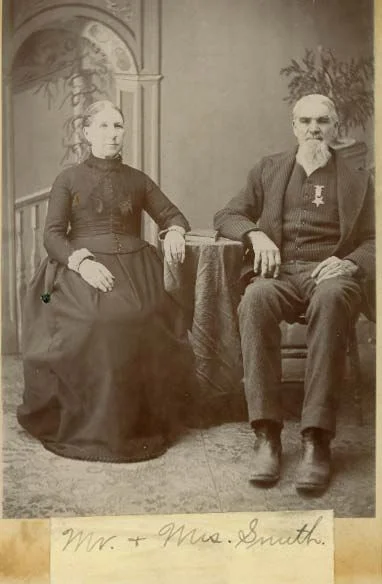
Updated October 27, 2026 · 1 photo · No prompt needed
Quick facts: Animate old photos on Vivimo
| Photos needed | Old family photo |
|---|---|
| Free preview | 2 a day, 5 s at 480p, watch online, no sign-up |
| With credits | 5–15 s, download without watermark; 720p with the Pro pack |
| Price | From $9.99 for 12 credits, one-time; 1 credit = 1 second at 480p |
| Prompt | Not needed; the motion is preset (you can still write your own on the home page) |
| Sound | Video only, no audio |
| Time | Usually 30 seconds to 3 minutes |
What old photo animation does (and does not do)
Old photo animation adds small, believable movement to a still portrait: a blink, a breath, a faint smile, a slight turn of the head. It works on black-and-white, sepia and faded color prints.
The AI does not know how the person really moved. It invents plausible motion from one frame, so keep expectations to gentle movement. Big actions such as talking, walking or hugging are more likely to change the face.
Vivimo keeps the vintage look on purpose: it does not colorize or "restore" the photo first. If your print is badly scratched, a quick restore in another app before uploading gives a cleaner result.
How to animate old photos with AI
- Scan or photograph the printLay the photo flat in daylight, avoid glare, and fill the frame. A phone picture is fine.
- Upload it and press MakeThe motion is preset for old photos: blink, soft smile, slight head turn, static camera.
- Watch, then download if you like itThe free preview plays online. Use credits for a watermark-free MP4 or a longer clip.
Photo tips for the best result
- Faces should be at least the size of a coin in the photo; tiny faces in group shots move less reliably.
- Crop away the album page or frame edge so the AI sees only the photo.
- Avoid glare and shadows from your phone when you photograph the print.
- For a group photo, expect the people in front to move most clearly.
- If a face looks different, try again: each run is a new attempt.
FAQ
Is it free?
Yes. You get 2 free previews a day: 5 seconds at 480p, watched online with a small Vivimo mark, and no sign-up. To download an MP4 without the mark, buy a one-time credit pack from $9.99 (12 credits; 1 credit = 1 second at 480p).
Can AI make an old photo move?
Yes. An image-to-video model adds gentle motion such as blinking, smiling and a slight head turn to a single still photo. It works on black-and-white and sepia prints as well as color.
Will it change my grandparents' faces?
It tries to keep them the same, and gentle motion keeps faces closest to the original. Large movements are more likely to drift, so the preset uses small ones.
Does Vivimo colorize or restore the photo?
No. The video keeps the original look. Restore or colorize the photo in another app first if you want that.
Can the people talk?
No. Vivimo makes silent 5–15 second clips with natural movement, not lip-synced speech.
Is it respectful to animate photos of people who have died?
Many families find it moving, others do not. Gentle motion is closest to the real photo. Please only share the result with people who would welcome it.
Who can see my photo?
Only you. Photos are deleted after 7 days and videos after 30 days, and we never use them to train models.
 Pet photo to video
 Animate a selfie
 Product photo to video
 2 photos
Trending AI video effects
 Keep On Steppin AIDo the Cale Brown steps from one photo
 Uptown Funk AILead the Uptown Funk street dance
 2 photosSmalltown Boy AIThe 80s high-note duo dance
 Rumpelstiltskin AIThe tiptoe dance meme, with your face
 2 photosAPT. AIA duo music video in the APT. style
 AI Halloween CostumeSee yourself move in costume
All AI video effects → · Turn any photo into a video with your own prompt →